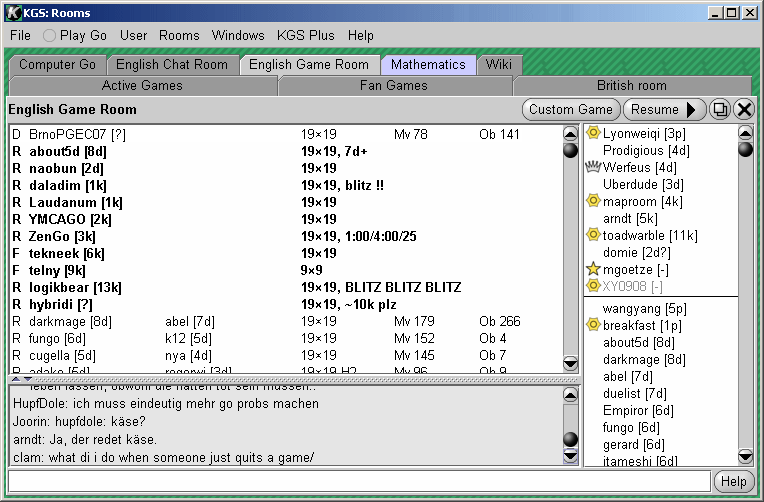
A tab for each
room you have open
This tab is pale because it is the room you are now in
This tab is blue because someone has chatted in the room since you last looked
People in the room. Click to chat.
These
icons indicate prizewinners,
admins, etc.
People above this line are my "buddies"
Game offers, in bold type
The
type of game: Rated, Free, etc.
Games being played, in normal type
You can move this bar up and down
The chat for the room
Unicode characters are supported
This is where you type in your own chat. But please read the
KGS Terms of Service first.
The user saying this ought to read the
escaper FAQ.
The names of people making
game offers
Descriptive game titles written by people offering games
White
Black
You can hover over games in this list for more information, and right-click to
join a game or re-order the list
You can right-click on any name in this list for a menu about the person and the list
Sliders, to let you see what else is in the panels
Takes you to the top of this help page
Number of moves made in each game
Number of people watching each game
There is a tab for each of the rooms that you are in. Each room has the following parts:
The main menu bar is at the top of the rooms window.
The Windows menu has a line for each KGS window that you have open. Clicking on the line transfers your focus to that window.












 in the upper right of the window. After logging off, please use