Main Help Page
FAQ
The main client window
The new game window
The game window
The preferences window
The server stats window

Rating system
Rating system Math
Playing games
Games Types
Supported Rule Sets
Supported time systems

Information for help editors
Help Discussion
Recent changes
Translations Available (click a flag to view):
German (Germany) English (United States) French (France) Japanese (Japan) Russian (Russia) Turkish (Turkey)

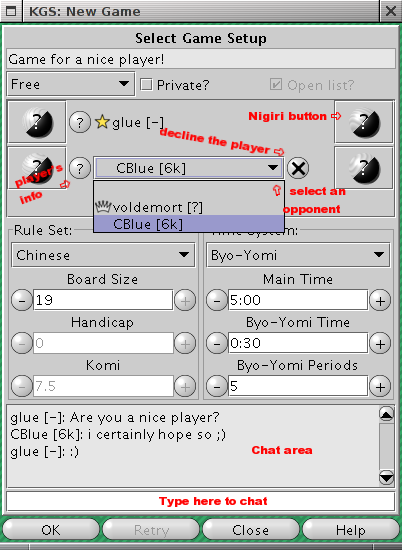
New Game window screen shot

The first text field of the new game window is the tag line. The text entered here will be displayed in your game listing in the games list.

The next item in the game window is the "Game Type" popup list. here you may select the type of game you wish to make (Rated, Free, Demonstration, etc)

Next to the game type popup list are two check boxes. Checking the "Private" box will make your game private so that only you, your opponent and any invited users are allowed to view the game. Checking the "Open List?" box will display your game request in the "Open Games" tab

The next item in the New Game window is the players list. This section will allow the players to configure the color they would like to play. Also the Poster of the new game can use this area to select which challenger they would like to play (in the event of multiple challengers. If the game type is simul The this section will have multiple entries, one for each challenger. If the game is started with "?" marks in the area for color selection the system will automatically nigiri for color.

The "Rule Set" section configures the type of game to be played. either player can adjust the "Board Size", "Handicap" or the "Komi". Also the rule set to be used can be selected from a popup list here. The rules include "Japanese", "Chinese", "AGA" and "New Zealand".

The "Time System" section is where either player may change the time settings. The players may select from one of the following time settings.

The next item is the Chat window. This chat area is visible to any observer or player that is viewing the current "New Game" window. the chat here is not seen in any chat room however.

The last item are the four button described below.


Edit this page (requires admin or translator privilege)

KGS