Automatch
|
The automatch feature is the easiest and quickest way to find an opponent on KGS. You decide a couple of settings then let the server pair match you to an opponent.
To start such a game, use Ctrl-N or click on the "Play Go" menu and check the "Automatch" box.
|
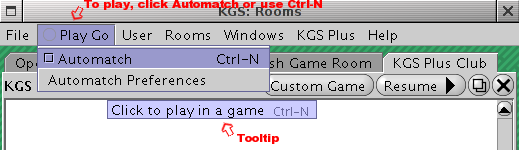
|
|
|
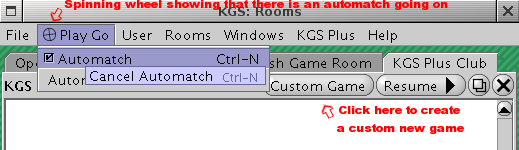
If you have a rank, or if you have entered a rank estimate in the automatch preferences page, automatch immediately looks for an opponent. The spinning wheel in the menu lets you know it is running. You just need to wait for a game to pop up! You can also cancel an automatch opponent search.
If "automatch" is active, the Circle in the "Play Go" menu title spins and has two lines through it.
Note! As soon as Automatch finds an opponent, the game will begin; it must be played! If you close the game it will be counted as an escaped game, even if no stones were played!
|
|
|
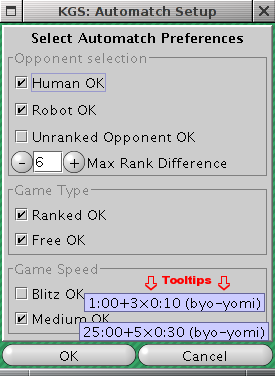
If you have no rank, the automatch set preferences window pops up and asks you to estimate your rank.
You can edit the settings by selecting "Automatch Preferences" in the "Play Go" menu.
Check or uncheck the boxes you wish.
Hovering over the different game speeds with your mouse explains the different speeds.
|
If you want to get a game really fast, check a lot of boxes and set a high max rank difference. Have fun !
With the information so far, you should be ready to go back to KGS and test the automatch feature. But if you still have questions, read the end of the page.
Does it challenge people who have an open game in a room? No, it only pairs to people who are using the automatch feature with settings that fit with yours.
Which ruleset does the automatch games use? Japanese ruleset.
Can I propose a custom game while automatch is running? Yes. If automatch doesn't pair you quick enough, feel free to start a custom game too! Your custom game requests are cancelled as soon as your automatch game pops up.
Can I change the time settings? You can check several boxes, but you can't choose different time settings from the ones proposed in the automatch preferences window. And, you can't uncheck all the time boxes, the system will ask you to check at least one of those.
Is there a confirm window before the game starts? No, the game pops up as soon as a fitting player is found. There is no confirmation. Make sure that the settings in the automatch preferences window are correct before starting the atuomatch opponent search. If there are users you don't want to play, just censor them and you won't get paired with them.
How do I save an automatch game? There is nothing to do. All the automatch games are automatically saved by the server, no matter how many moves they have. Even if your opponent escaped within the first 10 moves the game is still automatically saved.
If both players select "free" and "rated", will the automatch be free or rated? The system will set a rated game.
What if both players select several time systems? The time system will be randomly chosen amoung the selected ones.
Can I play games on 9x9 boards using automatch? No. Automatch games are only on 19x19 boards.
What if there is someone whom I do not wish as an opponent who also uses automatch? Please add that user to your censor list before looking for a game using automatch. Automatch will not pair you with users in your censor list.
What happens if I leave an automatch game? If you leave a rated automatch game, you'll be marked as escaper for the game, so please don't leave! You'll get the escaper mark even if you leave during the countdown before the first move.
Make very sure your automatch settings match what you want before you launch an automatch lookup, so that automatch gives you the kind of opponent that you want.
Up One Level
—> How to Get a Game –> Use KGS's "automatch" feature
Site Map
—> How to Get a Game
–> Automatch
Top
Edit this page (requires admin or translator privilege)


