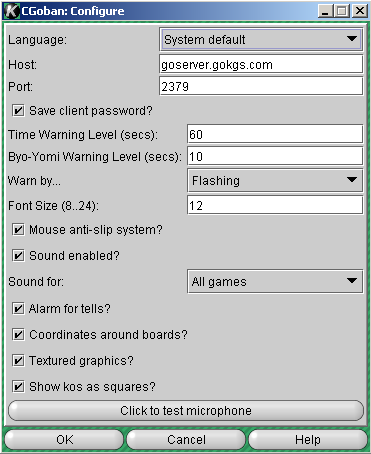
Set Preferences Page

The set preferences page has these editing controls:
- Language
-
This sets the language that you will see in all client text. Some of the text may change to the new language immediately, but you must exit the client completely and restart it for the complete change to take effect. The "System Default" option will use the language that your computer is set to use by default; other options will select that language.
- Host
-
This is the name of the computer running the KGS server. You should leave it as "goserver.gokgs.com" unless you are using a port forwarder. If you don't know whether you are using a port forwarder or not, then you aren't, so leave it at the default value!
- Port
-
Similar to the "host" field, this is the TCP/IP port of the KGS server. The default is 2379; leave it this way unless you are using a port forwarder.
- Save Client Password?
-
Checking this will mean that your password will be saved on your computer. Don't use this if you are on a shared computer!
- Time Warning level (sec)
-
This setting changes the amount of time the client warns the player of their time running out. For example if this field is set to 30 seconds then the client will warn the user when they have 30 seconds remaining on their clock. This setting is for the main game time.
- Byo-Yomi Warning Level (sec)
-
This is similar to the previous setting except this setting is for byo-yomi time.
- Warn by...
-
This setting is related to the two previous settings. This setting changes how the client warns the user. There are four selections in this popup list.
None: Turns off all warnings
Flash: Will flash the time clock for each second that passes during the warning period.
Beep: Will send the standard PC beep for each second that passes during the warning period
Both: This setting will turn on Both the "Flash" and "Beep" warnings.
- Font Size (8..24)
-
This field allows you to set the Displayed font size of the client Text. As indicated the Minimum allowed font size is 8 point font, and the maximum is 24 point font.
- Mouse anti-slip System?
-
This Check box toggles the "Mouse anti-slip System". This system basically rejects a mouse down event if the mouse cursor hasn't been stationary for about 1 second. It is intended to prevent a move made by unintended mouse click during a game
- Sound Enabled
-
This check box toggles the CGoban3 sound system.
- Sound for:
-
This setting lets the user select which games they will hear the sound in. This popup list has three selections.
No Games: Turns off sound for all games. (note other sounds remain enabled)
My Games: Turns on sound only for the games the user is playing in.
All Games: Turns sounds on for all games (both observed and played games)
- Coordinates around boards
-
This check box toggles the coordinates that display on the edges of the board during games. Note that pressing CTRL L in a game is another way to toggle this setting.
More fields will be added later.
このページを編集する (管理人または翻訳者のみ)