Tools for Demos, Teaching, and Review
KGS has several tools that can be quite helpful during demos or reviews.
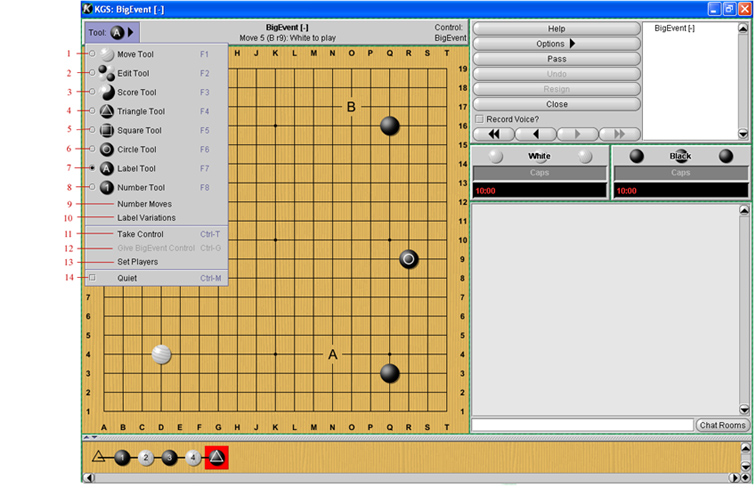
To display options/ instructions for some tool, hover the cursor over the tool.
To use a tool, click a tool to select it, then click on the board to:
- Play moves normally (b + w)
- Add or remove stones. (Click = add b stones only ; Shift+click = add w stones only)
- Score game after clicking to remove dead stones
- Mark stones or spaces with triangles
- Mark stones or spaces with squares
- Mark stones or spaces with circles
- Mark stones or spaces with letters A,B,C etc.
- Number spaces or stones, manually
- Number stones automatically (kifu)
- Edit game tree to label variations
- Take control of the display, after giving display control to someone else to show variations or positions (right-click their name, to give control)
- Give control to the person named
- Set names of b and w players ; (can be used to reverse colors, or to have one or two players continue from some position)
- Set "moderated chat" on/off ; [Normal accounts: only comments by the teacher and the student will appear (no comments by observers). For teaching accounts only: the teacher also can select observers' comments to show to all viewers.]
Up One Level
—> Game Types –> Teaching Game
Site Map
—> Game Types –> Teaching Game
Top
Edit this page (requires admin or translator privilege)


