KGS Client for Android™
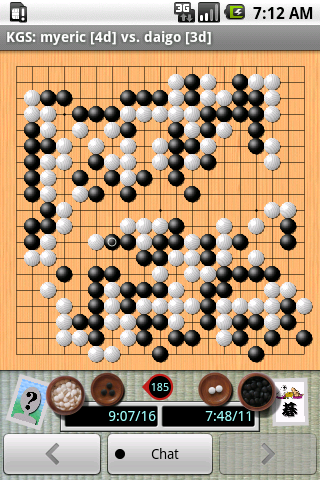
This is a page about the KGS Client for Android phones: this client is not running on all smartphones, it is only for the phones using the Android system. There is no client planned for other phones (windows mobile, iphone, etc).

Scan this image with an Android bar code scanner to take your phone straight to the Android Market page for KGS.
A KGS Client is available for Android phones! To download it, start the android marketplace on your phone and search for "KGS." The client costs $9.99 to install on your phone.
Please submit any bug reports to wms@igoweb.org.
Visit the
KGS Client page in the Android Market Place.
v3.5.2 - Released on 2011-07-15
- Red "move will be here" marker fades away when it isn't needed.
- xlarge tablets will default to stylus mode.
- xlarge tablets now has chat room and chat input next to board. Chat button is gone.
- Made stone graphics smoother.
- Added button with user count to game chat areas. Pressing it gets a list of the viewers of the game.
- Now get the "your tournament game has started! Do you want to join it?" popups when on android.
v3.5.0+3.5.1 - Released on 2011-05-21
- Fixed "invisible game list" bug.
- Fixed major bug in 3.5.1 with immediate 3.5.1 release.
v3.4.16 - Released on 2011-04-13
- Fixed scrolling of room list on Android 2.2 and later phones.
- Fixed font size of room list.
v3.4.15 - Released on 2011-04-12
- Fix ability to install on SD card
- Fix bug that prevented it from properly remembering what part of the client you were in when you last logged out
- Chat rooms! Chat rooms! Chat rooms!
- And private conversations too
- Added final score to "game info" dialog.
v3.4.14 - Released on 2011-02-23
- Russian translation
- Viet Namese translation
- When setting up a challenge, if it is ranked, it keeps the handicap within the allowed-for-ranked limits
- Support for Honeycomb tablets (still crude, I will probably buy a tablet before too long and improve the UI.)
- Allows you to install KGS on your SD card (oops, sorry this is broken)
v3.4.13 - Released on 2010-10-03
- German translation
- Added "no animation" option
v3.4.12 - Released 2010-09-29
- Sending challenges to the open game list
- Use Google authentication system. IMPORTANT: If you are told that you don't own this application, then please check with me. I'm worried about this system locking out legitimate people.
v3.4.11 - Released 2010-06-07
- Made it possible to set up handicap 9 demo games.
- Fixed pass button in demo games.
- Added French translation.
v3.4.10 - Released 2010-05-03
- Added a chat box to the widescreen landscape GUIs.
- Fixed the "press and hold home after leaving while watching a game" behavior.
- Added a few more help screens.
- Tweaks to the "still logged in" notification.
v3.4.9 - Released 2010-04-18
- Improved the Droid screens to fill the blank space. A mini chat is added and the components are brought together to fit nicely as they do on other phones.
- Added an option to put teeny tiny little labels around the board showing coordinates.
v3.4.7 and v3.4.8 - Released 2010-04-04
- Fixed missing "dead"/"alive"/"done" buttons during scoring.
- Fixed problem where leaving the app and returning left you with a board that didn't update properly.
- Fixed problem where the chat indicator wouldn't always light up when chat happened.
v3.4.6 - Released 2010-03-30
- Ability to record a game as a demo game. This includes a way to load and continue demo games, and a way to tag them and see their tags. As of now (Mar. 7), this works, but could be improved a lot; in particular, you can't navigate variations, and going back and forth through the file is difficult.
- Improved appearance of game screen, with tatami mat background. I'm getting ready to finish this with a more attractive layout showing clocks, captures, and avatars.
- Added avatar widgets showing mini-sized avatars. Touching them pops up a dialog with the full sized avatar. An "X" appears over the avatar if the player has left the game.
- Dialogs for users coming/going replaced by toast now that you can see who is there on the screen.
- Added "game info" dialog to see what kind of game, the rules, etc.
v3.4.5 - Released 2010-03-01
- Fixed board display on Tattoo.
v3.4.4 - Released 2010-02-26
- Fixed bug that broke game setup for some users.
v3.4.3 - Released 2010-02-24
- Fixed the "stuck with a nonresponsive client I can't log out of" bug.
- Took out the "<<" and ">>" buttons completely. Five buttons across the bottom was too much, too easy to mis-press. Now you press and hold on the "<" and ">" buttons to move all the way to the start or end - this makes more sense anyway, it isn't something you do often, PLUS it is an enhancement of the regular buttons, so a long press is a good way to provide these commands.
- Added a "stylus mode" preference that puts the stone where you touch, instead of next to where you drag.
- Fixed "no warning for joining private or KGS Plus games" bugs.
v3.4.2 - Released 2010-02-04
Release 3.4.2 will erase all your stored preferences. Sorry about that; I'd been managing my preferences in a way that didn't quite fit with standard android, and figured out how to do it "right" but not how to transfer them to the new system. From here on out they should not change.
- If you are watching or playing in a game and switch to another activity with your phone (e.g., answer a phone call or an SMS message), then you no longer log out of the server. Instead an icon appears in the status bar of your phone, clicking it returns to the game. This still isn't perfect, because sometimes I can't be sure whether you meant to log out or not, but it is better than before I think.
- Moved game titles to the task bar.
- Active games list is now presented in full, not chopped at 100 games.
- Phones with "small" (320x200) screens will be able to see KGS in the market as soon as this release is out. I think that only the Tattoo is affected by this problem right now.
- Internal rework. I'm still learning how best to use the Android system, and some of my early choices weren't so good; for this release I did a big cleanup that shouldn't be too visible to users, but improves the system and will make later changes easier.
- All chats from all games are now visible, not just chats with your opponent when you are playing.
- BUG: You no longer get the warnings when you try to open a KGS Plus-only game and you don't have KGS Plus. Private games probably have the same problem. I'll fix this in the next release.
- BUG: It is possible to get the app "stuck" with a nonresponsive client that you can't close. The only fix is to kill the KGS app with an android process killer app.
v3.4.1 - Released 2010-01-19
- Hide suggestions when entering password on android 2.0 phones.
- Added "fan games" option when looking at a list of games.
- GUI now responds properly when phone is tilted.
- Removed requirement for direction buttons, trackpad, or trackball.
- Improved performance of the ticking clocks.
v3.4.0 - Released 2010-01-17
- Minor changes to help files from beta 10.
- Prettier GUI screens (game screen and chat room screen are done, but eventually it would be nice to make the rest of them better also).
- Fix score display as a game you are watching is being scored.
- Allow participation in game reviews.
- Ability to see all marks from reviews.
- Grey out games that have ended in fan lists.
- Add move numbers to chats.
- Show chat from before you joined the game when you do join.
- Show names of real players in demo games.
Android is a trademark of Google Inc. Use of this trademark is subject to Google Permissions.
The tatami mat background is by Paul Kotta of Mellow Monk's green teas. Thanks Paul for letting me use the image!
Edit this page (requires admin or translator privilege)